
Start here
Every reef keeper has a “while I was out” story
-
It’s 2 p.m., you’re stuck in a meeting, and the internet at home has been down for an hour. You can’t see the tank from here. The question is whether your controller still knows to cut the heater and stop the top-off, or whether it’s waiting for the internet to come back.
-
The float switch sticks, and the top-off pump keeps going. Fresh water keeps going into the sump while you sleep, and you wake up to the sound of water running over and onto the floor. The salinity drops, and the mess is in your living room.
-
It’s day two of the trip and you’re at dinner when your phone buzzes: low temperature, Tank. The heater has quit. You text your neighbor, who knows where the spare heater is under the stand. The alert gave you time to sort it out from the restaurant.
Do you want a controller that quits when the internet does, or one that runs locally and keeps going?
Local control, the same idea Home Assistant is built on. The brains live in the controller under your stand, so no one’s server has to say yes before it cuts the heater or stops the top-off.
Keep your pumps and heater. Lose the extra boxes.
One gadget, one job, one app sounds tidy until you own five of them and there’s a folder on your phone with a dozen reef apps in it. Then something buzzes, and you’re opening them one by one to find out which one sent it. Here the heater, the top-off, the leak sensor and the outlets for your pumps and lights all run through one app, so the first place you look is the right one.
- Your equipment
- Power Hub
 ControllerHome Assistant
- Home network
- One app
Scan the code. Plug it in. Go feed the fish.
Controller
Home Assistant pre-installed
Power Hub
Eight switched outlets
Temperature probes
Tank and sump
Auto top-off
Pump and level sensors
Leak sensor
Alerts and top-off lockout
Dosing (Pro)
Calcium, alkalinity, magnesium
- pH
pH probe (Pro)
pH reading on your home screen
Named outlets
Each one switches on and off
It’s plug and play, not plug and pray.
Scan the QR code; keyed, color-coded plugs fit one way.
Stuck floats, stuck heaters, wet floors: what the controller does
Evaporation
Water level drops and salinity climbs.
Auto top-off with an overfill lockout.
Heater failure
A heater can stick on and overheat the tank, or quit and let it cool.
Temperature probes switch the heater off above your limit, and alert you if the tank cools.
Water on the floor
A leak under the stand goes unseen.
A leak sensor under the stand alerts you and locks out top-off.
Control Freak’s own safety rules (heater cutoff, top-off lockout and leak shutoff) keep running on the controller, even if Home Assistant stops.
One app for the tank and the house
Home Assistant is built in, so the same app that watches your tank can look after the rest of your home. You get taken care of as well as your fish tank is.
One place
With Home Assistant and the Control Freak integration pre-installed, your tank and compatible smart home devices meet in one app.
Works locally
Home Assistant stays on your home network, and the controller keeps running the tank when the internet connection drops.
Open foundation
Home Assistant is open source, run by a nonprofit, and runs locally, so no company can switch it off. Control Freak adds no subscription to your reef controller.
Voice access
Through Home Assistant and its companion app, it works with Google Home, Siri, CarPlay and Alexa: ask Alexa or Siri for tank status, tell Google Home to adjust the temperature, check it from CarPlay, and get voice alerts when something is out of balance.
Connect what you already own.
Home Assistant works with over a thousand brands of smart devices, over Wi-Fi, Bluetooth, Zigbee and Z-Wave. Zigbee and Z-Wave need a plug-in radio.
- Wi-Fi
- Bluetooth
- Zigbee
- Z-Wave
Home Assistant is a trademark of the Open Home Foundation.
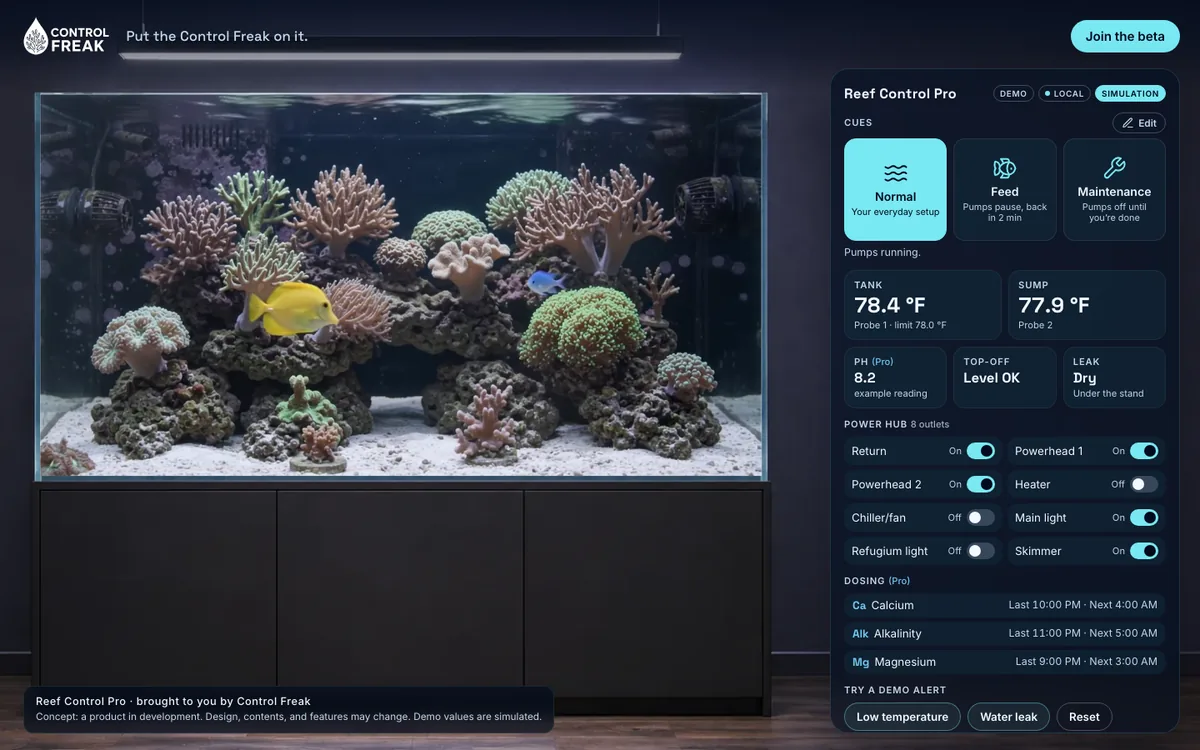
Demo
Try it before it’s under your stand
A simulation with example readings. Not live hardware and not the real app.
Water under the stand? Let the whole house know.
Idea · with Home Assistant
Water alert
When water is detected under the stand, have your hallway lights flash and compatible speakers announce where attention is needed.
Your hallway light isn’t included. Your speaker isn’t included.
Idea · with Home Assistant
Feeding time
Use a compatible button by the tank or your voice assistant to start Feed mode, pausing pumps before they resume automatically.
Your button isn’t included. Your voice assistant device isn’t included.
Idea · with Home Assistant
Siri
Use Siri through Home Assistant's HomeKit Bridge to check the tank or start Feed mode.
Your Apple device isn't included.
More possibilities for your reef
Planned add-on
More probes
ORP, salinity, and extra temperature probes are planned as separate additions, giving you more options beyond the probes in the kit.
Planned add-on
Top-off reservoir
A separate top-off reservoir is planned as another option for completing the setup alongside the kit’s pump and level sensors.
Planned add-on
Feed button
A keyed Control Freak button beside the tank is proposed as another way to start Feed mode.
Join the beta
Test it on your own tank
Your tank
Maybe you travel for work, or you’ve been burned by a heater, a top-off or an app. We’re looking for reef keepers who run a sump to test Reef Control Pro on their own tanks before launch. Set it up, live with it, and tell us what breaks, what’s confusing and what’s missing.